Managing employees with spreadsheets, paper records, and endless email threads quickly becomes overwhelming as a business grows. This is where an employee management app makes a significant difference.
An employee management app is software designed to help businesses organize, monitor, and streamline workforce-related activities from a single platform. It simplifies tasks such as attendance tracking, leave management, employee scheduling, payroll coordination, document storage, performance monitoring, and internal communication.
Whether you run a startup with five employees or a company with thousands of workers, the right employee management app can save countless hours while improving productivity and employee satisfaction.
In this beginner’s post, you’ll learn everything you need to know about employee management apps, including how they work, their key features, benefits, and tips for selecting the best solution for your business.
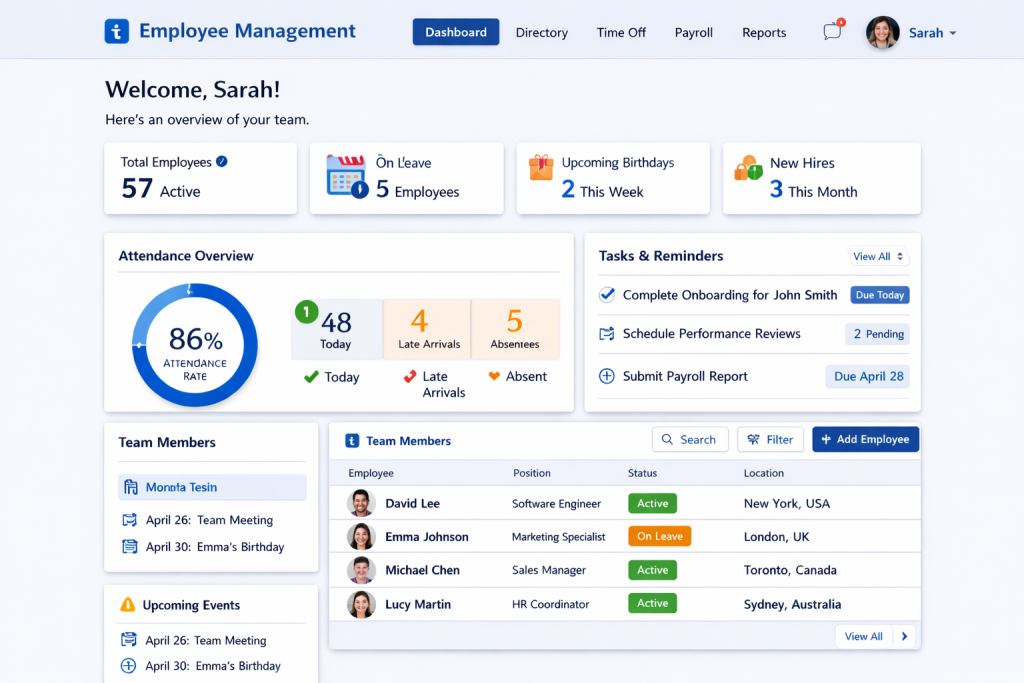
What Is an Employee Management App?
An employee management app is a digital HR solution that helps businesses manage their workforce efficiently through desktop or mobile devices.
Instead of handling employee information across multiple systems, the app centralizes everything into one dashboard.
Typical information includes:
- Employee profiles
- Attendance records
- Shift schedules
- Leave requests
- Payroll information
- Performance reviews
- Company documents
- Team communication
Modern employee management software often integrates with payroll systems, accounting software, recruitment platforms, and productivity tools.
Why Businesses Need an Employee Management App
As businesses expand, HR responsibilities become increasingly complex.
Without proper software, companies often experience:
- Payroll mistakes
- Missed attendance records
- Poor communication
- Scheduling conflicts
- Lost employee documents
- Compliance issues
- Reduced productivity
Employee management apps automate many of these processes, reducing manual work and minimizing human error.
How Does an Employee Management App Work?
Most employee management platforms follow a straightforward workflow.
Step 1: Employee Registration
HR creates employee profiles containing:
- Name
- Contact details
- Job title
- Department
- Salary information
- Employment documents
Step 2: Attendance Tracking
Employees clock in and out using:
- Mobile app
- Web portal
- Biometric devices
- GPS location
- QR codes
Attendance records update automatically.
Step 3: Leave Management
Employees submit leave requests digitally.
Managers can:
- Approve requests
- Reject requests
- Monitor leave balances
- View team calendars
Step 4: Performance Tracking
Managers evaluate employee performance using:
- Goals
- KPIs
- Feedback
- Reviews
- Productivity reports
Step 5: Payroll Support
Many apps automatically calculate:
- Working hours
- Overtime
- Paid leave
- Payroll reports
Some platforms also integrate directly with payroll providers.
Key Features of Employee Management Apps
The best employee management software combines multiple HR tools into one platform.
Employee Database
Stores:
- Personal details
- Emergency contacts
- Employment history
- Documents
- Contracts
Attendance Management
Features include:
- Time tracking
- GPS attendance
- Facial recognition
- Biometric integration
- Remote work tracking
Leave Management
Employees can:
- Apply for leave
- Check balances
- Upload supporting documents
- Receive approval notifications
Managers get a complete leave calendar.
Shift Scheduling
Ideal for:
- Restaurants
- Hospitals
- Retail stores
- Manufacturing
- Customer support teams
Managers assign shifts in minutes.
Payroll Integration
Many apps calculate:
- Working hours
- Bonuses
- Deductions
- Taxes
- Overtime
Payroll reports can be exported easily.
Employee Self-Service
Employees can independently:
- Download payslips
- Update personal details
- Apply for leave
- View attendance
- Access HR documents
This reduces HR workload.
Performance Management
Managers can monitor:
- Goals
- Productivity
- Reviews
- Feedback
- Promotions
Internal Communication
Some apps include:
- Team chat
- Company announcements
- Notice boards
- Surveys
- Task assignments
Document Management
Securely stores:
- Offer letters
- Contracts
- Tax forms
- IDs
- Certifications
Everything remains searchable.
Benefits of Using an Employee Management App
Saves Time
Automation eliminates repetitive HR tasks.
HR teams spend less time on paperwork and more time supporting employees.
Reduces Errors
Automatic calculations reduce mistakes in:
- Attendance
- Payroll
- Leave balances
Improves Productivity
Employees spend less time requesting HR assistance.
Managers quickly access workforce information.
Better Compliance
Many apps maintain records required for labor laws and audits.
This helps businesses avoid compliance risks.
Supports Remote Teams
Employees can:
- Clock in remotely
- Request leave
- View schedules
- Communicate with managers
Perfect for hybrid workplaces.
Better Decision-Making
Real-time dashboards provide insights into:
- Attendance trends
- Employee turnover
- Productivity
- Labor costs
Who Should Use an Employee Management App?
Employee management software benefits organizations of every size.
Small Businesses
Ideal for managing growing teams without hiring additional HR staff.
Medium Businesses
Helps standardize HR processes across departments.
Large Enterprises
Supports thousands of employees with advanced reporting and automation.
Remote Companies
Essential for managing distributed teams across multiple locations.
Retail Businesses
Simplifies shift scheduling and attendance tracking.
Healthcare Organizations
Manages rotating staff schedules efficiently.
Manufacturing Companies
Tracks shifts, overtime, and workforce productivity.
Employee Management App vs HR Software
Although these terms are often used interchangeably, they are slightly different.
| Employee Management App | HR Software |
|---|---|
| Focuses on daily workforce management | Covers complete HR lifecycle |
| Attendance tracking | Recruitment |
| Leave management | Training |
| Scheduling | Benefits administration |
| Communication | Workforce planning |
| Employee records | Advanced HR analytics |
Many modern platforms combine both functions.
Essential Features to Look For
Before selecting software, check whether it offers:
- Easy-to-use interface
- Mobile application
- Attendance tracking
- Leave management
- Payroll integration
- Employee self-service
- Reporting dashboard
- Performance management
- Shift scheduling
- Secure cloud storage
- Role-based permissions
- Third-party integrations
Common Mistakes to Avoid
Choosing Based Only on Price
Low-cost software may lack important features.
Ignoring Mobile Access
Most employees prefer managing HR tasks using smartphones.
Not Checking Integrations
Ensure the app works with your:
- Payroll software
- Accounting platform
- Communication tools
Overlooking Security
Employee information contains sensitive personal data.
Choose software with:
- Encryption
- Secure login
- Data backups
- Role-based access
How to Choose the Best Employee Management App
Consider these factors:
Business Size
Small businesses require simple software.
Larger companies benefit from automation and analytics.
Industry Requirements
Retail businesses prioritize scheduling.
Remote teams prioritize communication.
Manufacturing companies require attendance tracking.
Ease of Use
Employees should learn the software quickly.
Customer Support
Reliable customer support minimizes downtime.
Scalability
Choose software that grows with your company.
Future Trends in Employee Management Apps
Employee management software continues to evolve with new technologies.
Emerging trends include:
- AI-powered scheduling
- Predictive workforce analytics
- Voice assistants
- Automated onboarding
- Digital employee IDs
- Facial recognition attendance
- Workflow automation
- Employee wellness tracking
These innovations help businesses improve operational efficiency while enhancing the employee experience.
Frequently Asked Questions
What is an employee management app?
An employee management app is software that helps businesses manage attendance, employee records, leave requests, payroll support, scheduling, performance, and communication from one platform.
Is employee management software suitable for small businesses?
Yes. Many affordable solutions are designed specifically for startups and small businesses, helping them automate HR tasks without requiring a large HR team.
Can employees use the app on mobile devices?
Most modern employee management apps provide Android and iOS applications, allowing employees to check attendance, request leave, access payslips, and communicate with managers from anywhere.
Does an employee management app replace HR?
No. It automates repetitive administrative tasks, allowing HR professionals to focus on employee engagement, hiring, training, and strategic planning.
Is employee data secure?
Reputable employee management platforms use encryption, secure cloud storage, user permissions, and regular backups to protect sensitive employee information.
Final Thoughts
An employee management app is more than just a digital attendance system—it serves as a centralized platform for organizing employee information, streamlining HR processes, improving communication, and increasing workplace efficiency. By automating routine tasks such as attendance tracking, leave approvals, scheduling, and payroll coordination, businesses can reduce administrative overhead and focus on growth.
Whether you’re a small business owner taking your first steps toward HR automation or a growing organization looking to simplify workforce management, investing in the right employee management app can lead to better productivity, improved employee satisfaction, and stronger operational control. As workplace technology continues to evolve with AI and automation, adopting a modern employee management solution today can help future-proof your business.


