How to Set Up Deel Payroll for Global Employees
Hiring employees from different countries has become a competitive advantage for businesses of all sizes. Instead of limiting recruitment to one location, companies can now build international teams with specialized talent from around the world.
While global hiring creates exciting opportunities, it also introduces new responsibilities. Every country has unique payroll rules, tax requirements, employment laws, and payment processes. Managing these manually can be time-consuming and increase the risk of costly errors.
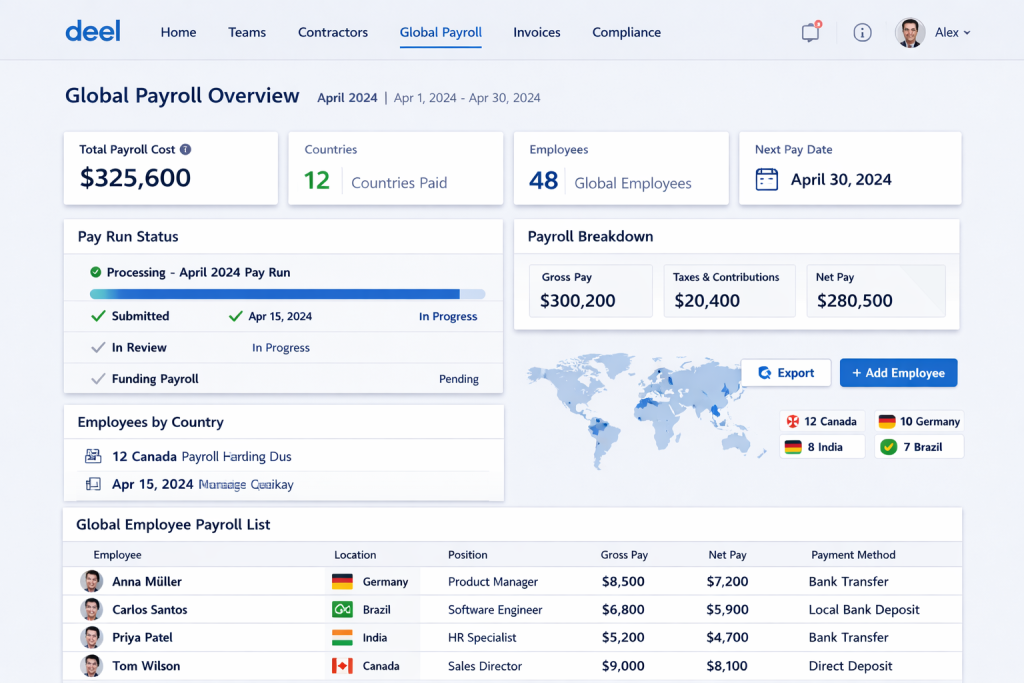
This is where Deel Payroll helps. Designed for businesses with distributed teams, Deel provides a centralized platform for onboarding employees, processing payroll, supporting compliance, and managing international payments.
If you’re considering Deel for your business, this guide explains how to set up Deel Payroll for global employees, from preparing your workforce data to running your first payroll successfully.
Why Choose Deel Payroll for Global Teams?
Before setting up the platform, it’s helpful to understand why many businesses use Deel for international payroll.
Key advantages include:
- Centralized payroll management
- Support for employees and contractors
- Employer of Record (EOR) services in supported countries
- Multi-currency payroll
- Automated payroll calculations
- Localized compliance workflows
- Digital onboarding
- Payroll reporting and analytics
- HR document management
- Integrations with popular business software
These capabilities make Deel particularly useful for startups, remote-first companies, and businesses expanding into international markets.
Step 1: Define Your Global Hiring Strategy
Before configuring payroll, determine how you plan to build your international workforce.
Questions to consider include:
- Which countries will you hire in?
- Will workers be employees or contractors?
- Do you already have legal entities in those countries?
- Do you need Employer of Record (EOR) services?
- What currencies will employees be paid in?
- How frequently will payroll run?
Answering these questions helps establish a clear payroll structure before onboarding begins.
Step 2: Create Your Deel Account
Once you’ve chosen Deel, create your company account and complete the initial business setup.
You’ll typically provide details such as:
- Company name
- Business address
- Billing information
- Company contacts
- Payroll administrators
- Finance team members
You can also assign user roles so HR, finance, and management teams have appropriate access to payroll information.
Step 3: Add Global Employees
After your account is configured, begin onboarding your workforce.
For each employee, you’ll typically collect:
- Full legal name
- Contact information
- Job title
- Country of employment
- Salary details
- Start date
- Bank account information
- Tax-related documentation where required
Employees can often complete portions of the onboarding process themselves through secure digital workflows, reducing administrative work for HR teams.
Step 4: Select the Appropriate Employment Model
Deel supports different workforce arrangements depending on your business needs.
Direct Employees
If your company has a legal entity in a country, you may employ workers directly while using Deel Payroll to manage payroll administration.
Employer of Record (EOR)
If you don’t have a local entity, Deel’s Employer of Record service may allow you to hire employees through a locally compliant employment structure in supported countries.
Independent Contractors
For freelancers and consultants, Deel offers contractor management tools, including contract creation, payment processing, and documentation management.
Selecting the correct employment model helps ensure payroll is managed according to local legal requirements.
Step 5: Configure Payroll Settings
Next, configure your payroll preferences.
Common settings include:
- Payroll schedule
- Salary frequency
- Currency
- Bonuses
- Commission structures
- Expense reimbursements
- Overtime policies
- Paid leave tracking
Businesses should ensure these settings align with employment agreements and applicable local regulations.
Step 6: Review Compliance Requirements
International payroll involves more than paying salaries.
Businesses should verify requirements such as:
- Payroll taxes
- Social security contributions
- Mandatory benefits
- Paid leave obligations
- Local labor regulations
- Employment documentation
Deel provides localized workflows that support compliance with country-specific payroll requirements, helping reduce administrative complexity.
Step 7: Connect Payroll Integrations
Many organizations integrate payroll with other business software.
Common integrations include:
- Accounting systems
- HR platforms
- Time tracking software
- Expense management tools
- Identity management platforms
Connecting these systems helps reduce duplicate data entry and improves operational efficiency.
Step 8: Run a Payroll Review
Before processing your first payroll, review all payroll information carefully.
Check:
- Employee salaries
- Bank account details
- Bonuses
- Reimbursements
- Leave balances
- Payroll deductions
- Payment dates
- Employee classifications
A final review helps identify discrepancies before payroll is approved.
Step 9: Approve Payroll
Once payroll has been reviewed, authorized administrators approve the payroll run.
At this stage, payroll calculations are finalized and scheduled for payment according to the selected payroll calendar.
Step 10: Employees Receive Payments
After payroll is processed, employees receive their salaries through supported payment methods in accordance with the configured payroll schedule.
Employees can also access payroll documents, such as payslips, through their secure accounts where available.
Managing Contractors Through Deel
Many companies work with independent contractors alongside full-time employees.
Deel helps simplify contractor management by allowing businesses to:
- Create compliant agreements
- Approve invoices
- Schedule recurring payments
- Collect required documentation
- Maintain payment records
This creates a consistent workflow for managing both employees and contractors from one platform.
Payroll Reports and Analytics
After each payroll cycle, Deel provides reporting tools that help businesses monitor workforce costs.
Reports can include insights into:
- Payroll expenses
- Department budgets
- Country-specific payroll costs
- Bonuses and reimbursements
- Payroll history
These reports support budgeting, forecasting, and financial planning.
Security Features
Payroll systems store sensitive employee and financial information, making security essential.
Deel incorporates enterprise-grade safeguards such as:
- Data encryption
- Secure cloud infrastructure
- Multi-factor authentication (MFA)
- Role-based access controls
- Audit logs
- Secure document storage
These measures help protect confidential payroll data.
Best Practices for Setting Up Global Payroll
To make payroll management smoother, consider these practices:
Standardize Onboarding
Use consistent onboarding processes for every employee to reduce administrative errors.
Keep Employee Records Current
Update employee information promptly whenever salaries, addresses, banking details, or employment terms change.
Verify Payroll Before Approval
Review payroll reports before every payroll cycle to catch potential issues early.
Maintain Compliance Documentation
Store contracts, tax forms, and payroll records securely for future reference and audits.
Monitor Local Employment Regulations
Employment requirements may change over time, so review applicable regulations regularly as your workforce expands.
Common Mistakes to Avoid
Businesses new to international payroll should watch out for:
- Misclassifying employees and contractors
- Using incorrect payment schedules
- Entering inaccurate banking information
- Forgetting mandatory payroll deductions
- Delaying employee onboarding
- Skipping payroll reviews
- Failing to maintain documentation
- Ignoring local employment requirements
Avoiding these mistakes helps create a smoother payroll experience for both employers and employees.
Advantages of Deel Payroll
- Supports payroll in more than 150 countries
- Centralized payroll dashboard
- Employer of Record services
- Contractor management
- Multi-currency payroll
- Automated payroll calculations
- Digital onboarding
- Payroll reporting
- Compliance support
- Scalable platform for growing businesses
Frequently Asked Questions
Can I use Deel Payroll without opening a company overseas?
Yes. In many supported countries, Deel’s Employer of Record (EOR) service allows businesses to hire employees without establishing a local legal entity.
Does Deel support contractor payments?
Yes. Deel includes tools for contractor agreements, documentation, invoicing, and international payments.
Is Deel suitable for startups?
Absolutely. Many startups use Deel to simplify international hiring and payroll while growing remote teams.
Can payroll be managed from one dashboard?
Yes. Deel centralizes payroll administration for employees and contractors across multiple countries.
Does Deel help with compliance?
Deel provides localized payroll workflows and compliance tools that help businesses manage payroll according to applicable employment and payroll requirements. Businesses remain responsible for meeting their legal obligations.
Final Thoughts
Setting up payroll for an international workforce may seem daunting at first, but the right platform can make the process far more manageable. Deel Payroll streamlines onboarding, payroll processing, contractor management, and compliance into one centralized system, allowing businesses to support global teams with greater efficiency.
Whether you’re hiring your first remote employee or expanding into multiple countries, investing time in a structured payroll setup helps reduce administrative overhead, improve payroll accuracy, and create a better experience for employees around the world.
With thoughtful planning and the right payroll workflows in place, your business will be well positioned to grow confidently across international markets.