Managing employees has become more complex than ever. Businesses now need to coordinate remote teams, field workers, office staff, contractors, and shift-based employees while maintaining productivity, compliance, and effective communication.
Traditional methods like spreadsheets, paper timesheets, WhatsApp groups, and manual scheduling often lead to errors, wasted time, and poor employee experiences.
This is where an Employee Management App comes in.
An employee management app is designed to simplify daily workforce operations by bringing scheduling, attendance, communication, HR, task management, and reporting into one easy-to-use platform. Whether you own a small business with 10 employees or manage hundreds of frontline workers across multiple locations, these apps help you save time, reduce administrative work, and keep your team connected.
In this beginner’s guide, we’ll explain everything you need to know about employee management apps, how they work, their key features, benefits, and how to choose the best solution for your business.
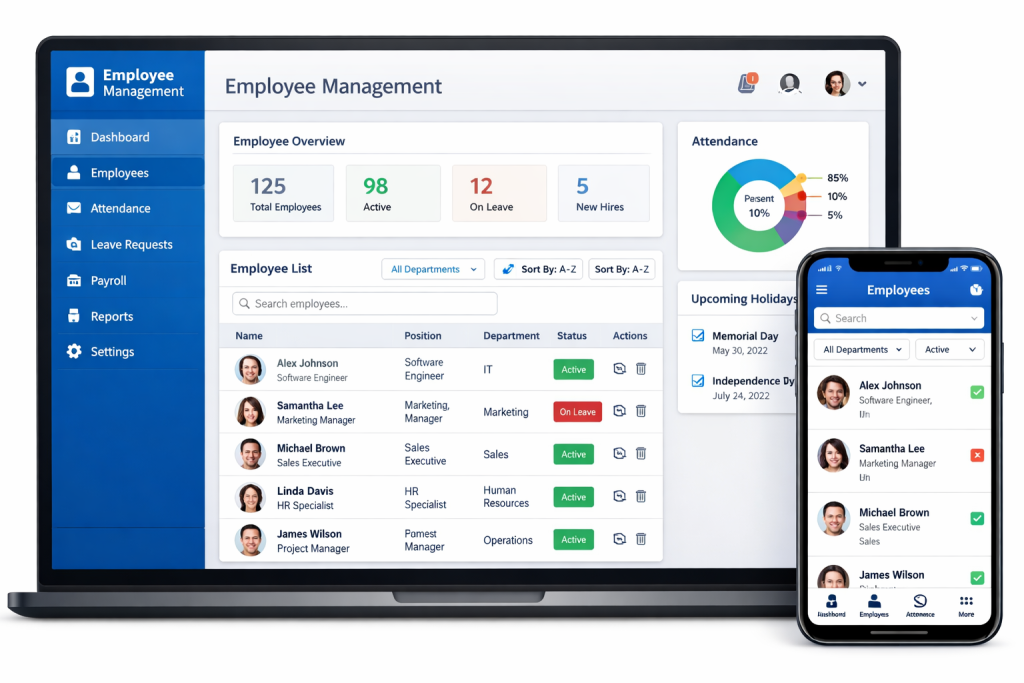
What Is an Employee Management App?
An Employee Management App is software that helps businesses organize, monitor, and manage their workforce using a computer or mobile device.
Instead of handling employee information across multiple systems, the app centralizes essential workforce operations into one platform.
Most employee management apps allow managers to:
- Schedule employee shifts
- Track attendance and work hours
- Communicate with staff
- Assign tasks
- Manage leave requests
- Store employee records
- Train employees
- Generate reports
- Prepare payroll data
- Monitor productivity
Employees also benefit by being able to:
- View work schedules
- Clock in and out
- Request leave
- Receive announcements
- Complete assigned tasks
- Access training materials
- Update personal information
In short, an employee management app simplifies workforce administration while improving communication between managers and employees.
How Does an Employee Management App Work?
Most employee management apps operate through a cloud-based platform with dedicated web and mobile applications.
Here’s a typical workflow:
- Managers create employee profiles and define roles or departments.
- Work schedules are assigned and shared with employees.
- Employees receive shift notifications on their smartphones.
- Workers clock in and out using the app, often with GPS verification.
- Managers monitor attendance, approve leave requests, and assign tasks.
- Timesheets are automatically generated for payroll.
- Reports provide insights into attendance, productivity, overtime, and workforce performance.
Because everything is stored in the cloud, both managers and employees can access information from anywhere with an internet connection.
Why Do Businesses Need an Employee Management App?
As businesses grow, managing employees manually becomes increasingly difficult.
Common challenges include:
- Scheduling conflicts
- Missed shifts
- Manual payroll errors
- Poor communication
- Lost paperwork
- Time theft
- Difficulty tracking remote employees
- Inconsistent onboarding
- Compliance risks
An employee management app helps solve these issues by automating routine processes and providing a centralized workspace for workforce management.
Key Features of an Employee Management App
While features vary by provider, most modern employee management apps include the following capabilities.
1. Employee Scheduling
Scheduling tools allow managers to:
- Create work shifts
- Assign employees
- Swap shifts
- Manage recurring schedules
- Notify employees automatically
This reduces scheduling errors and improves workforce planning.
2. Time Tracking
Time tracking features often include:
- Mobile clock-in and clock-out
- GPS verification
- Geofencing
- Break tracking
- Overtime calculation
- Automatic timesheets
These tools improve payroll accuracy and reduce manual work.
3. Team Communication
Instead of relying on personal messaging apps, businesses can communicate through secure workplace channels.
Typical communication features include:
- Team chat
- Company announcements
- News feeds
- Employee directories
- Polls and surveys
4. Task Management
Managers can assign tasks, monitor progress, and receive completion notifications.
Employees always know:
- What needs to be done
- Deadlines
- Priority levels
- Supporting documents
5. Leave Management
Employees can submit requests for:
- Vacation
- Sick leave
- Personal leave
- Paid time off (PTO)
Managers receive notifications and can approve or reject requests directly within the app.
6. HR Management
Employee management apps often include HR tools such as:
- Employee records
- Digital document storage
- Policy acknowledgments
- Performance tracking
- Certification management
These features help keep personnel information organized and accessible.
7. Employee Onboarding
New employees can complete onboarding through the app by accessing:
- Welcome documents
- Company policies
- Training videos
- Quizzes
- Forms
This creates a more consistent onboarding experience.
8. Training and Learning
Many platforms include learning management features that allow businesses to:
- Upload training materials
- Deliver courses
- Track completion
- Assess employee knowledge
9. Reporting and Analytics
Managers can generate reports covering:
- Attendance
- Overtime
- Payroll hours
- Task completion
- Employee performance
- Scheduling trends
These insights support better decision-making.
Benefits of Using an Employee Management App
Implementing an employee management app offers advantages for both employers and employees.
Improved Productivity
Automating scheduling, attendance, and task management frees managers to focus on higher-value work.
Better Communication
Employees receive updates, schedules, and announcements instantly, reducing misunderstandings.
More Accurate Payroll
Automated timesheets reduce manual calculations and payroll errors.
Stronger Accountability
GPS time tracking and task monitoring improve visibility into daily operations.
Reduced Paperwork
Digital forms, employee records, and reports eliminate the need for paper-based processes.
Enhanced Employee Experience
Self-service features give employees greater control over schedules, leave requests, and personal information.
Better Compliance
Digital records help businesses maintain documentation for labor laws, certifications, and workplace policies.
Who Should Use an Employee Management App?
Employee management apps benefit organizations of all sizes.
They are especially valuable for:
- Construction companies
- Restaurants
- Retail stores
- Healthcare providers
- Manufacturing businesses
- Cleaning services
- Logistics companies
- Hospitality businesses
- Delivery services
- Security firms
- Landscaping companies
- Field service organizations
Businesses with mobile or shift-based workforces typically gain the greatest value.
How to Choose the Best Employee Management App
With many solutions available, consider the following factors before making a decision.
Ease of Use
Choose software that employees can learn quickly without extensive training.
Mobile Accessibility
A strong mobile app is essential for deskless and remote workers.
Scheduling Features
Look for flexible scheduling with recurring shifts, notifications, and conflict detection.
Time Tracking
GPS tracking, geofencing, and automated timesheets improve attendance accuracy.
Communication Tools
Built-in messaging and announcements help keep teams informed.
Integrations
Check compatibility with payroll, accounting, HR, and productivity software.
Reporting
Comprehensive reporting supports workforce planning and payroll preparation.
Scalability
Select software that can grow alongside your business.
Pricing
Compare plans based on features, employee limits, and long-term value—not just the monthly cost.
Common Mistakes to Avoid
When selecting an employee management app, avoid these common pitfalls:
- Choosing software based solely on price
- Ignoring employee usability
- Overlooking mobile functionality
- Paying for features you don’t need
- Failing to evaluate customer support
- Not considering future business growth
Taking time to assess your operational needs can lead to a better long-term investment.
Popular Employee Management Apps
Several platforms are widely used for workforce management, each offering different strengths.
| App | Best For | Key Strength |
|---|---|---|
| Connecteam | Deskless teams | All-in-one workforce management |
| Homebase | Small businesses | Scheduling and time tracking |
| Deputy | Shift-based businesses | Employee scheduling |
| BambooHR | HR-focused companies | Human resources management |
| Rippling | Growing businesses | HR and IT management |
| Zoho People | SMBs | HR administration |
The best choice depends on your business size, industry, and operational requirements.
Are Employee Management Apps Secure?
Most reputable providers prioritize security by offering:
- Data encryption
- Secure cloud storage
- Role-based access permissions
- Regular backups
- Compliance with industry security standards
Businesses should also establish internal policies for password management and employee access.
Is an Employee Management App Worth It?
For most businesses, the answer is yes.
An employee management app reduces administrative work, improves communication, simplifies scheduling, and helps managers make more informed decisions using real-time workforce data.
The time saved on routine tasks often outweighs the subscription cost, particularly for businesses with growing or distributed teams.
Final Thoughts
Employee management apps have become essential tools for modern businesses looking to streamline workforce operations and improve employee engagement.
By centralizing scheduling, attendance, communication, HR, training, and reporting into one platform, these solutions help organizations work more efficiently while providing employees with a better day-to-day experience.
Whether you’re managing a small local team or a large mobile workforce, investing in the right employee management app can lead to improved productivity, reduced administrative burden, and more effective workforce management.
The key is to choose a solution that matches your business goals, scales with your growth, and offers the features your team will actually use.
Frequently Asked Questions (FAQs)
What is an employee management app?
An employee management app is software that helps businesses manage scheduling, attendance, communication, HR records, tasks, training, and workforce operations from one centralized platform.
Who should use an employee management app?
Businesses of all sizes can benefit, especially those with shift-based, mobile, remote, or frontline employees.
Can an employee management app replace spreadsheets?
Yes. Most apps automate scheduling, attendance, reporting, and employee records, eliminating many manual spreadsheet processes.
Are employee management apps suitable for small businesses?
Absolutely. Many providers offer affordable or free plans designed specifically for startups and small businesses.
What features should I look for?
Key features include employee scheduling, time tracking, team communication, leave management, task management, HR tools, reporting, and a user-friendly mobile app.


